Easter Gifts at Chocolate.com
Showing posts with label Technology. Show all posts

Tuesday, March 1, 2011

iPad and Motorola Xoom Comparision Videos on YouTube

iPad vs Motorola Xoom
Last week, two videos comparing iPad and Motorola Xoom have been posted on YouTube. The two YouTube videos, one of the two is posted by Wirefly and the other one is by SoldierKnowsBest, reviewed the performances and main features of iPad and Motorola's table Xoom, letting us to believe that Xoom is generally performing better than iPad (not iPad 2).

Tip: You could use Leawo Free YouTube Downloader to download the YouTube videos below to your computer. The software is free. It can search, view and download online videos.


Motorola Xoom equips with Google's latest tablet Operating System Android 3.0 (Honeycomb), 1GHz dual-core processor, 1GB RAM and two cameras; while iPad's processor is single-core, the RAM is only 256MB and no camera. iPad is completely defeated by Xoom in terms of functionality and performance. Xoom is so powerful that it makes Apple has to publish new generation for iPad in a short period of time. The below picture shows detailed comparision of iPad and Motorola Xoom.
iPad and Motorola Xoom comparision
It's rejoice to Google Android users but bad for Apple fans. one Apple fan cries, "It's a bad compare. Compare it soon with the iPad 2" One Android fan added, "Xoom owns iPad so bad. Jobs better has something good for the announcement on March 2nd."

It's rumored that iPad 2 is scheduled to released tomorrow with a lower price than the first-gen iPad, and the white iPad will also be available. They're just rumors. We'd better wait and see.

Thursday, February 17, 2011

Predict the 83rd Oscar Winners via Google Oscar Search Trends

Hey, buddy, you know that the 83rd Annualy Oscar Academy Awards will be held on February 27, 2011; believe or not, I know who will be the 83rd Oscar winners! You might think that I've got to be kidding you. I just 'know' it, as I have Google Oscar Search Trends, a tool newly released by the world best search engine Google to predict the Oscar winners.

Google Oscar Search Trends
Niv Efron, member of Google Insights' search team, said that
in the past three years the Best Picture winners (The Hurt Locker, Slumdog Millionaire and No Country for Old Men) have all shown an upward trend in searches for at least four weeks before the awards.


Past Oscar winners search trends
Currently searches of Black Swan is far beyond Inception and The Fighter. If the above prediction pattern applied to this year's Oscar-nominated films, Black Swan will be the Oscar Best Picture winner! Funny! Everyone know the winners of Oscar before the award! Just go to Google Oscar Search Trends and make your own prediction! The tool collects all nominees in all categories.

However, Efron said that 'We can't say for sure what will happen this year, since searches can only reflect what people are interested in, but it's fun to look for patterns that persist year after year'.

Off topic: YouTube users can use Leawo Free YouTube Downloader to download Flash videos from YouTube and any other websites. It is free.

Thursday, January 20, 2011

Chrome Drops Support for H.264 to Push Open Source WebM Codec

WebM VS H.264 - Chrome Supports WebM and Drops H.264
As the report from Google Chrome Official Blog, future versions of the Chrome browser will not support playback of H.264 format video anymore. Instead, Chrome will support Google's self-developed open format WebM. This means that, users can not directly see H.264 format videos on Chrome in the future, and have to search for third-party extensions. Currently H.264 is the most widely used web video encoding formats. Google's move will push WebM open format, and replace H.264 gradually.

According to Wikipedia -
WebM is a multimedia container format designed to provide a royalty-free, high-quality open video compression format for use with HTML5 video. The project's development is sponsored by Google.
A WebM file consists of VP8 video and Vorbis audio streams, in a container based on a profile of Matroska. The project releases WebM related software under a BSD license and all users are granted a worldwide, non-exclusive, no-charge, royalty-free patent license.

Google said that WebM is rather efficient, as WebM video can play smoothly on netbook, tablet and handsets. YouTube, the subsidiary of Google will surely support WebM. Additionally, Adobe announced that its Flash Player will be updated to support VP8, but has not announced support for Vorbis or the Matroska-based WebM container. Other companies that support WebM includes AMD, ARM, Broadcom, Freescale, NVIDIA, Qualcomm, TI, etc. Intel is also considering hardware-based acceleration for WebM in its Atom-based TV chips if the format gains popularity. Internet Explorer 9 will also be able to support WebM files if the VP8 codec is installed locally. WebM is also supported by popular web browsers such as FireFox, Chrome and Opera.


Off topic: YouTube users can use Leawo Free YouTube Downloader to download Flash videos from YouTube and any other websites. It is free.

Monday, December 20, 2010

Watch YouTube Videos Online in Windows Phone 7 Cellphone

RealTube - YouTube solution on smart phonesWindows Phone 7 is Microsoft's latest mobile operating system for smart phones. Yet, it's a shame that the new Windows Phone 7 does not support YouTube. What's worse, WP 7 doesn't officially support Flash or HTML 5 in the browser. You're gonna to change this Embarrassing situation with a third party application.

A few days ago HTC released a free app for anyone with a Windows Phone 7 device built by the handset maker.

You can also pay $1.99 for an app called RealTube which let you watch YouTube on Windows Phone 7 if you don't have an HTC cellphone. With RealTube, you can also view video content on sites that use Adobe Flash technique, such as CNN, DailyMotion, FunnyorDie, MySpace, and MSN, etc.

How does RealTube work? It just converts Adobe Flash video to Silverlight, which is necessary for WP 7 phones.

RealTube isn't a complete YouTube app, meaning it won't let you manage your YouTube account, view updates from your friends, or all those other features you would expect from a dedicated YouTube app.

You have to pay for the application if you want to continue to use it after 15 days free trial.


P.S. Microsoft's current solution for YouTube on Windows Phones is a mere plugin, which basically opens YouTube web app in browser (not the HTML5 version as seen on iOS and Android devices) and then allows you to playback videos using the native Windows Phone 7 video player. Microsoft's YouTube plugin also integrates with Zune's music and videos hub, allowing users to go through their YouTube playback history.


Off topic: YouTube users can use Leawo Free YouTube Downloader to download Flash videos from YouTube and any other websites. It is free.

Wednesday, November 10, 2010

Remote Control YouTube Playback on TV or PC from Android Phones or Tablets

Android YouTube Remote Application
Smart phone can be a TV remote control. There is, of course, nothing new here. As not long ago Apple has already released its Remote App for iPhone and iPad, which can control iTunes when synced with an Apple computer or Apple TV.

Google, the owner of YouTube and Android, now has the similar application for its cell phone OS Android. On Tuesday, Google officially launched a free Android application called YouTube Remote, which enables Android smart phone or tablet users to remote control the playback of YouTube videos on Google TV or PC.

This application creates a 'virtual connection' between a Android device (such as Android smart phone or Android tablet) and Google TV (also called YouTube Leanback) or computer. To make the 'virtual connection' work, you need two applications and to sign in to the two apps with a Google account.

If you don't have Google TV, you can get YouTube Leanback at YouTube.com/leanback.

This YouTube Remote application is available only in the US at the moment; and you can't get it anywhere except Google's Android Marketplace.

Want to download videos from YouTube? I recommend Leawo Free YouTube Downloader. It can download all flash videos from YouTube. It can also download videos from other websites as long as they use Adobe Flash Player. This is its user guide.

Wednesday, October 27, 2010

54% of H.264 Online Videos Are Available for HTML5 Playback

A new report of online video from MeFeedia said that by this October, the rate of HTML5 compatible video in all online video has reached 54%, double in the past 5 months. This is a good news for iOS users, as they can directly view more online videos in their iPad or iPhone.

In this report, MeFeedia discovers that mobile is the main driving force of the HTML5 video adoption rate. In mobiles such as iPhone, iPad and Android, HTML5 compatible (mostly H.264) video is the most common format.
What's more, a lot of publishers and platforms have offered iframe embed method, instead of the traditional object embed method for their videos, which can dynamically display Flash or HTML5 video content to users depending on the client devices.
Here are some examples. In January 2010, YouTube launched HTML5 Beta, an experimental version of its site, and only browsers that support HTML5 video can play the videos in this HTML5 Beta version of YouTube. In July this year, YouTube announced that they began to support the iframe embed. In addition, notable video sites including Vimeo, Dailymotion and Blip.tv, they all begin to support HTML5 standard and provide iframe embeds for their videos.
However, Adobe Flash remains the dominant video playback method within desktop environments.

The trend is that access to the Internet using mobile is growing rapidly, and will keep the growth rate within the next 5 to 10 years. So we can expect that most video sites will follow this trend, and ad services, advanced player features will be combined with HTML5 video.

Off-topic: To download online video to computer hard drive, Leawo Free YouTube Downloader is a good choice. It is a free video downloader that can download Flash video from most websites. This is its user guide.

Sunday, September 26, 2010

Notable Video Downloader Tools and Sites (Part One)

There are a lot of video sharing websites nowadays, we can enjoy watching all kinds of videos in our free time. But we want more. We also want to download the online videos from the Internet to computer, for watching them off-line. The problem is that most of these websites don’t provide us a video downloader for doing that.

Now I show you some notable video downloaders that are being used by the mainstream web users.

1. SpeedBit Video Downloader
This downloader is a toolbar installed on your web browser. It supports Flash video downloading. There are 3 steps to download Flash video to your computer: Play, Click and Save.


2. Leawo YouTube Downloader
It is an all-in-one browser, video downloader manager, video accelerator, video converter and FLV player. It is a web browser that can download online video, and accelerate the loading speed of online video, so that you can view online video smoothly. It also has options for video conversion. What's more, you can play FLV video in its built-in FLV player.

It can download almost all Flash videos from the Internet as long as they are play through Adobe Flash Player.

Its free version supports comman definition online video download and acceleration while its pro version supports High Definition online video download and acceleration.


You can learn more details about this downloader from
this user manual.

3. Video DownloadHelper - Mozilla Firefox Extension
It is an extension for the Mozilla Firefox. It enables users to grab video and images from websites. If you're a Firefox fan, you can use it to download and convert web videos from websites.


4. keepvid.com
It's a website. You can copy and paste video link to its 'URL' box and click 'Download' button to start to download an online video. You can also drag it to your browser's links tool bar to integrate it with your browser. Sometimes it doesn't work after some video sites changes.


5. YouTube downloader of altervista.org
It is a desktop downloader application. It supports video downloading and conversion for YouTube and some other websites.


To be continued..

Reshipment from Flash video player talk

Wednesday, August 18, 2010

iPhone users having problems signing into YouTube application

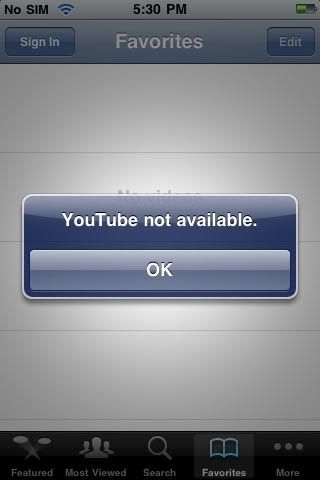
Yesterday, we learned that some iPhone and iPod users can not sign in their YouTube Application. A "YouTube not available" error message popped up once clicked the "sign in" button. Just as shown in the below picture:

YouTube not available on iPhone

Soon afterwards in the Apple forums, users posted at least one thread in discussion of this problem. The user writes:

"When I try to log in to the YouTube app on my iPad I get a message telling me the YouTube app is unavailable and then logs back out. I have the correct user and pass so I’m not sure why it's doing it. All other apps are ok and I am connected to the Internet."

Anyone else having the same problem?

Advertisement by Leawo Software:
Leawo Free YouTube Downloader is a free web video downloader. It can download all Flash video from the Internet. It can automatically detect and download web video to your computer. Besides, it is an all-in-one browser, video download manager, video accelerator and FLV player.

Reshipment from Flash video player blog

Thursday, August 12, 2010

Upcoming Windows Phone 7 applications to include YouTube and Yelp

Reshipment from Flash video player blog.

Windows Phone 7
does not support online video, because it doesn't support Flash or HTML5 video, but now it seems that you can view YouTube video with some sort of YouTube application.

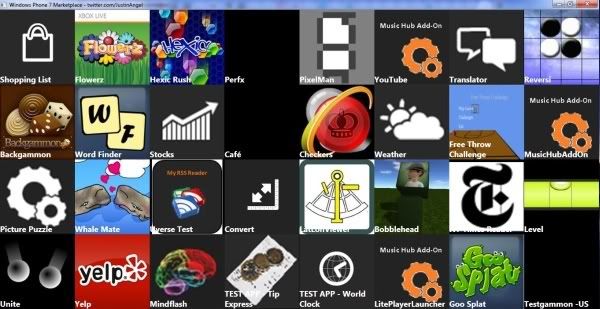
Earlier this week, a former Microsoft programmer posted a tweet with a picture shown as collage of "Windows Phone 7 Marketplace testing applications icons and names." The photo reveals that the upcoming Microsoft Phone 7 will offer different game and productivity applications, and one of these applications is labeled 'YouTube', one is labeled 'Yelp'. Just as the below picture shown:
Picture

Upcoming Windows Phone 7 applications to include YouTube

However, the 'YouTube' labeled application is also labeled 'Music Hub Add-On', which may mean that it's not an independent application, but rather an addon of the Windows Phone 7 Music hub, so you can add YouTube content to the existing Music hub.

Other testing applications in the collage photo include a few games, weather tool, RSS reader, stock tool, shopping list, etc.

More YouTube news

Thursday, June 17, 2010

My opinion about Google TV

When Google TV was announced in Google I/O on May 23, 2010, we had a lot of questions about it. Yesterday, Google posted a Google TV introduction video on its official YouTube channel. (You can use Leawo Free YouTube Downloader to download this video to your computer.) But the content of this video is rather limited. We still don't know what exactly is Google TV and what is the advantage of Google TV.

Just as Google said, "TV meets web. Web meets TV". So this means people can surf the Internet while watching TV. (For example, while I'm watching NBA, I can view what is discussing about this game on twitter) I don't know the advantage of this feature, because if I simply insert a TV card into my computer and I can do the same thing.

Maybe Google TV is just a platform to make more people be able to surf the Internet via TV. For example, some old people, they don't know how to use computer or laptop, so they cannot surf the Internet. But they know how to use TV, so they might be able to surf the Internet in case they have Google TV.

You could learn more information relevant to Google TV from this article.

Wednesday, June 16, 2010

What is Google TV


At its heart, Google TV is a platform.

Google TV was announced today. But what exactly is it? Give us two minutes.

It's a software platform
You know how the Nexus One is a piece of hardware by HTC that runs Android, a piece of software by Google? That's how Google TV will work. At its heart, Google TV is a platform. It's software. Hardware makers will need to step up to use it in their devices.

... that Logitech, Sony and DISH will support ...
Right now, there are three places we'll see Google TV: a set top box by Logitech, Sony televisions (and one Blu-ray player) and an upcoming DISH box. They all share the following common specs: An Atom (or better) processor, discrete GPU, HDMI-out, Bluetooth, IR (with a transmitting "blaster"), Wi-Fi, and Ethernet, all while supporting a keyboard and a pointing device, as well as more traditional remotes such as Logitech's Harmony universals. From what we understand, all of these products will be available at Best Buy in fall of 2010 (though it's possible DISH may be later).

...that works with your existing cable/satellite box...
Equipped with an IR blaster to change channels, Google TV can sit on top of your existing infrastructure. So while new hardware is in the works, it should be compatible with whatever you're using now—cable or satellite boxes, with all relevant subscriptions.

...that works just like a Google search...
When you start any Google TV device, you're greeted by a simple search bar. You type what you'd like to watch. That can be a television station, allowing you to select and tune that channel. Or it can be a show, which will point you to places you can find the show—be that through a cable subscription channel, Netflix or somewhere on the web.

...that combines the web with TV...
So say you want to watch something that only exists on Amazon's streaming service. You'll be taken to Amazon's webpage through Chrome, where the video will stream. Random websites might look crumby on your television, of course, which is why Google asks that sites optimize for Google TV (full SDKs available in 2011). With this mix of web and television, you can also view multiple sources of information in multiple panes. So you can watch the Sox game on one part of your screen while reading Paul Konerko's realtime stats in another.

...that runs apps...
Oh, Google TV includes complete access to the Android App Store. And Google suspects that most any app will run fine on the platform, though those designed with cellphone-specific hardware in mind might not work with 1:1 compatibility. But when the SDK is available in 2011, we can expect Google TV-specific apps, too.

...that supports Flash...
I'm pretty sure the audience cheered at this part. And when Google says Flash, they mean the videos and the games.

...that still has some tricks up its sleeve...
As of yet, Google has barely scratched the surface of what this seemingly unparalleled integration of TV and web can do, but they demoed one wow-worthy function: firing closed captioning through Google Translate—translating a program in real time. Just try to tell us that's not neat. (We will translate any negative comments into a language we don't understand—in real time.)

...that is not Chrome OS.
Remember Chrome OS? Google TV and its apps have nothing to do with it—not at the moment, at least.

Source is gizmodo.com